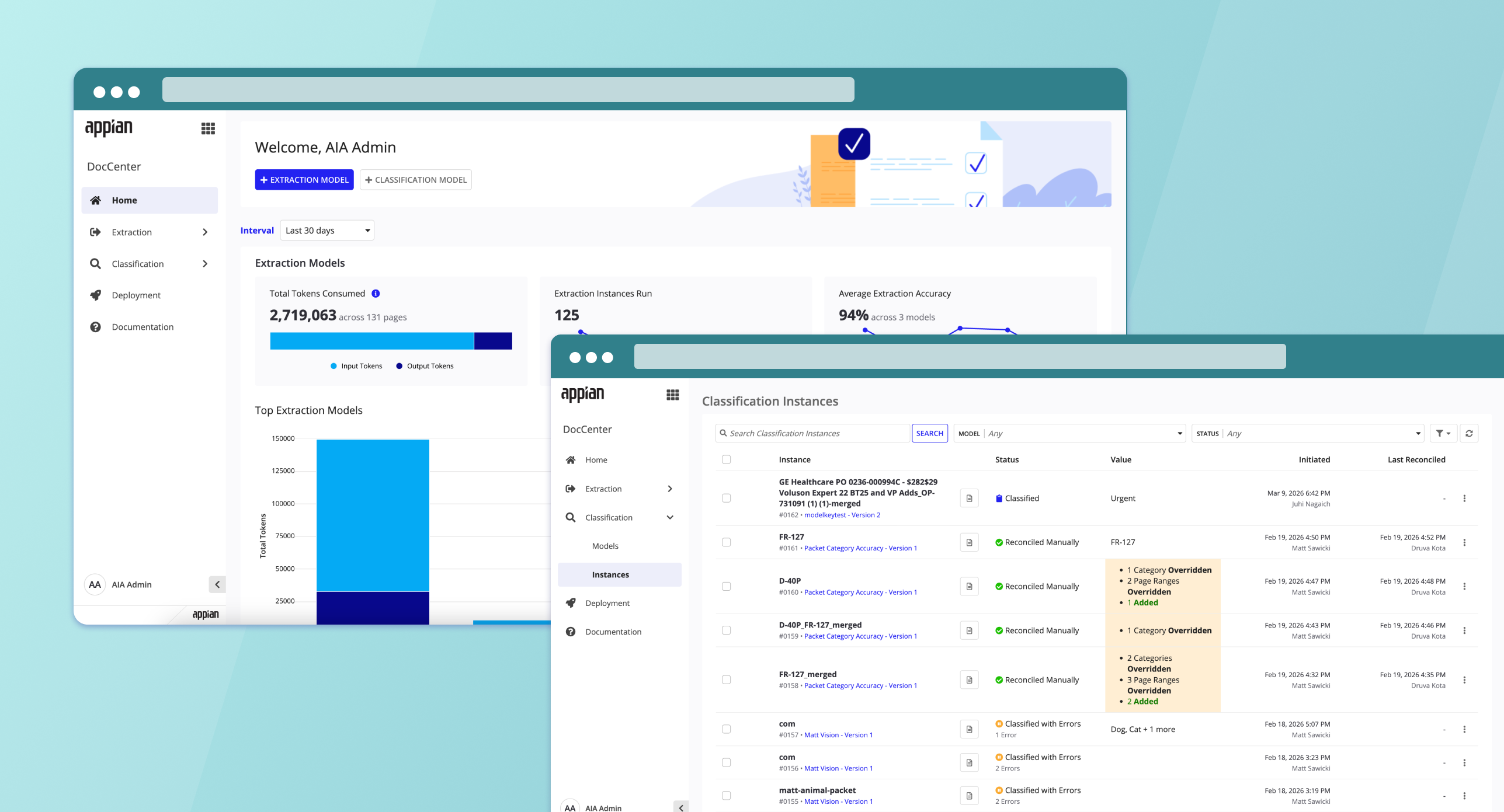
DocCenter
I lead UX for Appian's intelligent document processing platform, making it possible for users of all technical backgrounds to build, test, and refine AI models for classifying and extracting data from complex documents. I started as co-lead and took over full ownership as the product's scope grew.
Role
UX Lead (started as Co-Lead)
Started as co-lead, took over full ownership as scope grew
Timeline
Sept 2025 - Present
Team
Product, Eng, AI
Scope
End-to-end Design
Product Overview
DocCenter is Appian's platform for intelligent document processing. Basically, it's the tool that lets organizations teach AI how to read their documents: classifying them by type and pulling out the data that actually matters. My job is making that process feel manageable for everyone using it, not just ML engineers.
Classification
Build AI models that automatically classify documents by type, with built-in testing to ensure accuracy.
Extraction
Create and configure AI models to extract data from complex documents with varied layouts.
Monitoring
Track accuracy of classification and extraction models across development, testing, and production.
Testing & Versioning
Rapidly iterate on models by testing directly in the app, reconciling results, and viewing performance metrics.
Key Features
Detailed walkthroughs of the design challenges I tackled and the decisions behind each solution.
Context
In a lot of industries, insurance, mortgage, healthcare, documents don't arrive one at a time. They show up as bundled PDF packets: a single file containing multiple documents, like insurance forms, purchase orders, or medical records all stapled together.
Before packet splitting existed, users had to manually break apart these multi-document PDFs before uploading them for classification. For teams processing hundreds or thousands of packets a day, that was a massive bottleneck. I wanted the classification model to handle this on its own: figure out where one document ends and another begins, split them, and route each one for downstream extraction.
User Research
I interviewed solutions architects working on two active customer engagements: a healthcare equipment manufacturer (3-15 docs per case) and a lending institution (50-100 page loan packets with 15-30 document types). Both had built fragile multi-step workarounds just to compensate for DocCenter's single-document limitation.
Pain Points
Multi-step workarounds
Both teams built 3-step pipelines (extract page ranges, split PDF, then classify) just to get around the limitation. It added fragile steps and burned through way more tokens than it should have.
Boundary detection failures
The extraction step kept struggling with visually similar documents, merging them into a single page range instead of catching where one document ended and the next began.
Custom wrappers required
Teams had to build their own custom orchestration layers around DocCenter just to handle the one-case-to-many-documents relationship it didn't natively support.
False positives without catch-all
Without an "Other" category, the model would force-fit unknown documents into existing categories. That created classification errors that were hard to even trace back.
Key Insights
Splitting belongs in classification. Moving packet splitting into the classification step would cut out an entire processing stage. Both architects asked for this independently, as a simple toggle in model config.
Accuracy beats speed. Customers consistently cared more about classification accuracy than processing speed. They'd rather break tasks into smaller, targeted prompts even if it took longer.
There are two kinds of "multiple" here. DocCenter needs to handle both one case containing many documents, and one file containing multiple document types within it.
Design Direction
Build packet splitting directly into classification model configuration as a simple opt-in, not a separate tool or a multi-step pipeline. Include an "Other" catch-all category by default, and design the reconciliation flow so users can verify and correct AI-detected boundaries before any data flows downstream.
How It Works
Packet splitting gets enabled during classification model configuration. I wanted this to be low-friction: one toggle, and a reconciliation flow people already know how to use.
Identify & Separate
Automatically detect where one document ends and the next begins within a single upload (e.g., insurance bundles or bulk purchase orders).
Updated Reconciliation Interface
Use the updated UI to verify split points and ensure 100% accuracy before the data hits your core systems.
Early User Flow
Before jumping into UI, I mapped out the core user flow and the key design questions I still needed to answer: how should the AI split documents, by logical boundaries or by page numbers? Should we offer pre-trained classification out of the box, or let users teach custom document types? And what's the actual tradeoff between accuracy and upfront effort?
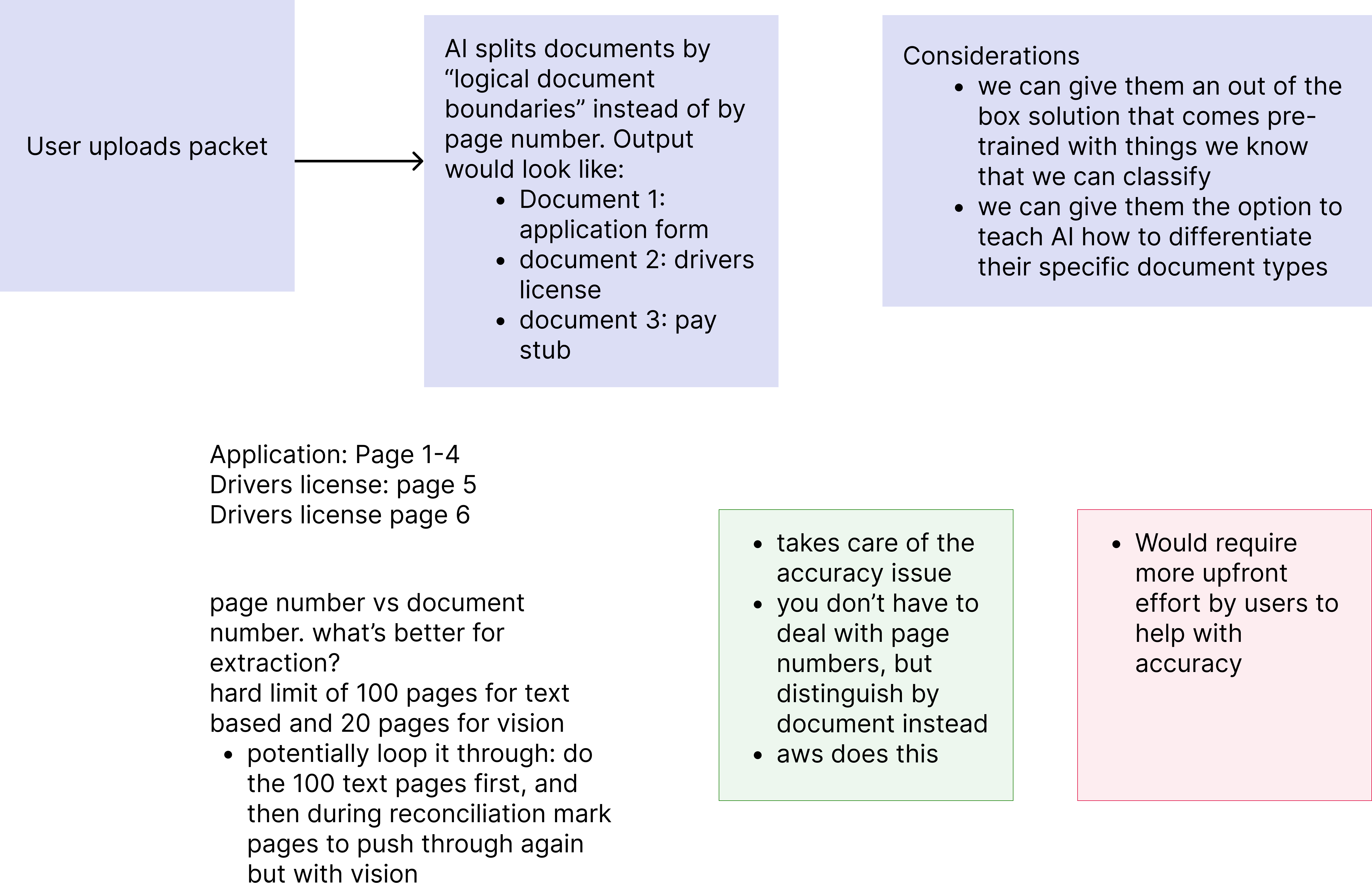
Early user flow -- exploring how the AI identifies document boundaries, output structure, page limits (100 text / 20 vision), and the pros and cons of document-based vs. page-based splitting.
Competitive Research
I looked at how the major cloud platforms handle multi-document packet splitting to find the gaps and figure out where DocCenter could actually differentiate.
Google Cloud Document AI
Uses a two-phase approach. Developers first train a Custom Splitter model by manually labeling page ranges per document type in the Document AI Workbench, then deploy it as an API. The AI learns the visual and textual features of each document type, so page order doesn't really matter.
AWS Bedrock Data Automation (Modern Flow)
This is the newer, recommended AWS path. Developers create "Blueprints" (schemas) for each document type, configure a project with splitting turned on, and deploy as an API. Bedrock handles split, classify, and extract in one pass, closer to what Google offers as a single product.
AWS Textract + Comprehend (Classic Flow)
The legacy build-it-yourself approach. Train a Comprehend classifier, burst PDFs into single pages via Lambda, classify each page on its own, write custom grouping logic, then route to Textract for extraction. Full control, but the orchestration is genuinely complex.
Also Evaluated
Blue Prism, Microsoft Azure Document Intelligence (custom classification models), and Twyzer were also reviewed as part of this competitive landscape.
Key Takeaway for DocCenter
Every competitor needs real developer involvement to set up packet splitting, whether that's manual labeling (Google) or multi-service orchestration (AWS Classic). A single toggle at model creation, paired with a reconciliation review flow people already understand, is a real differentiator for low-code users.
Mid-Fi Mockups
With the user flow validated, I moved into mid-fidelity wireframes to define the UI structure across two key surfaces: model creation (where packet splitting is configured) and reconciliation (where users verify split results).
Create Classification Model
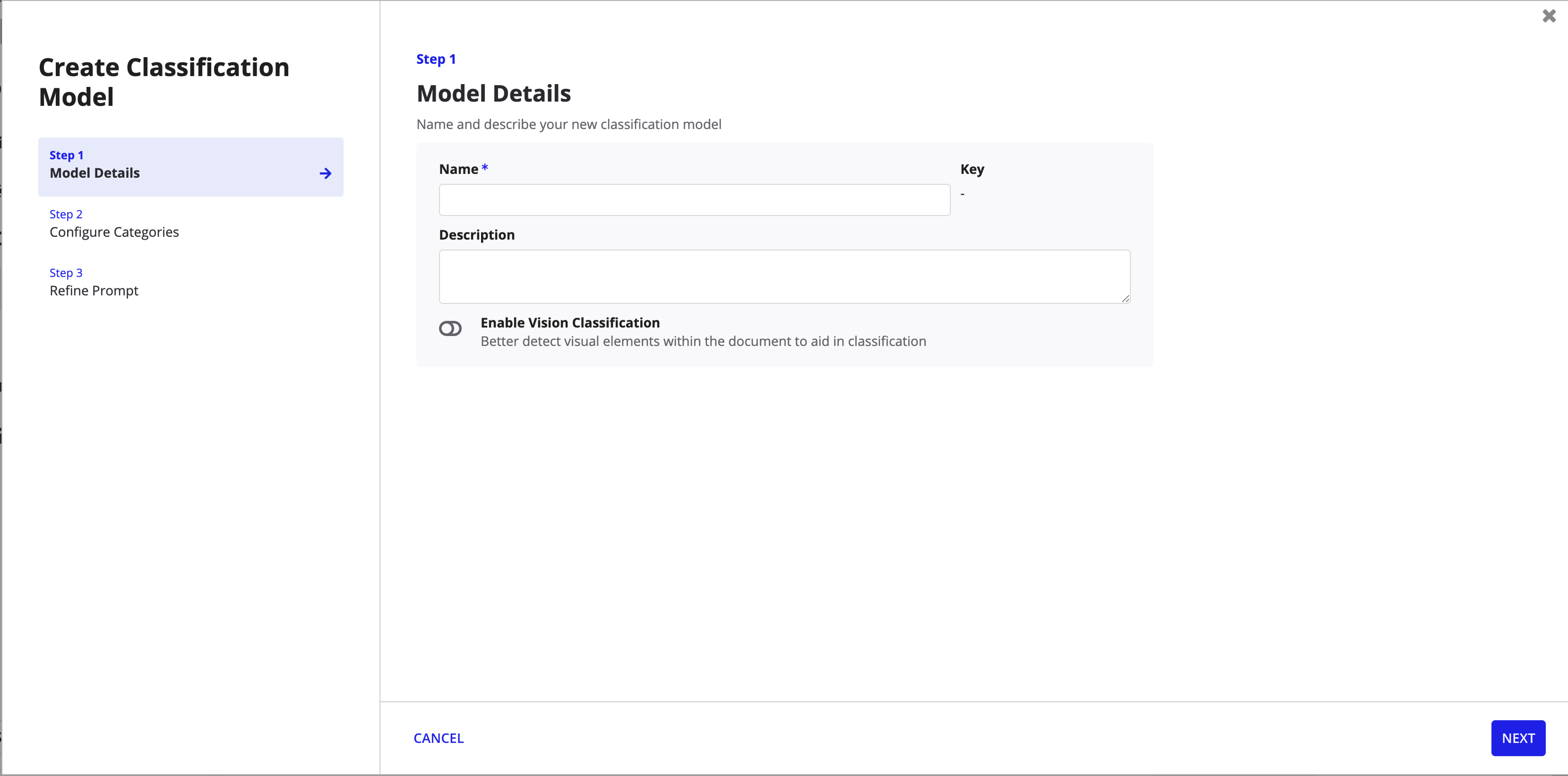
Step 1: Model Details -- name, description, and vision toggle.
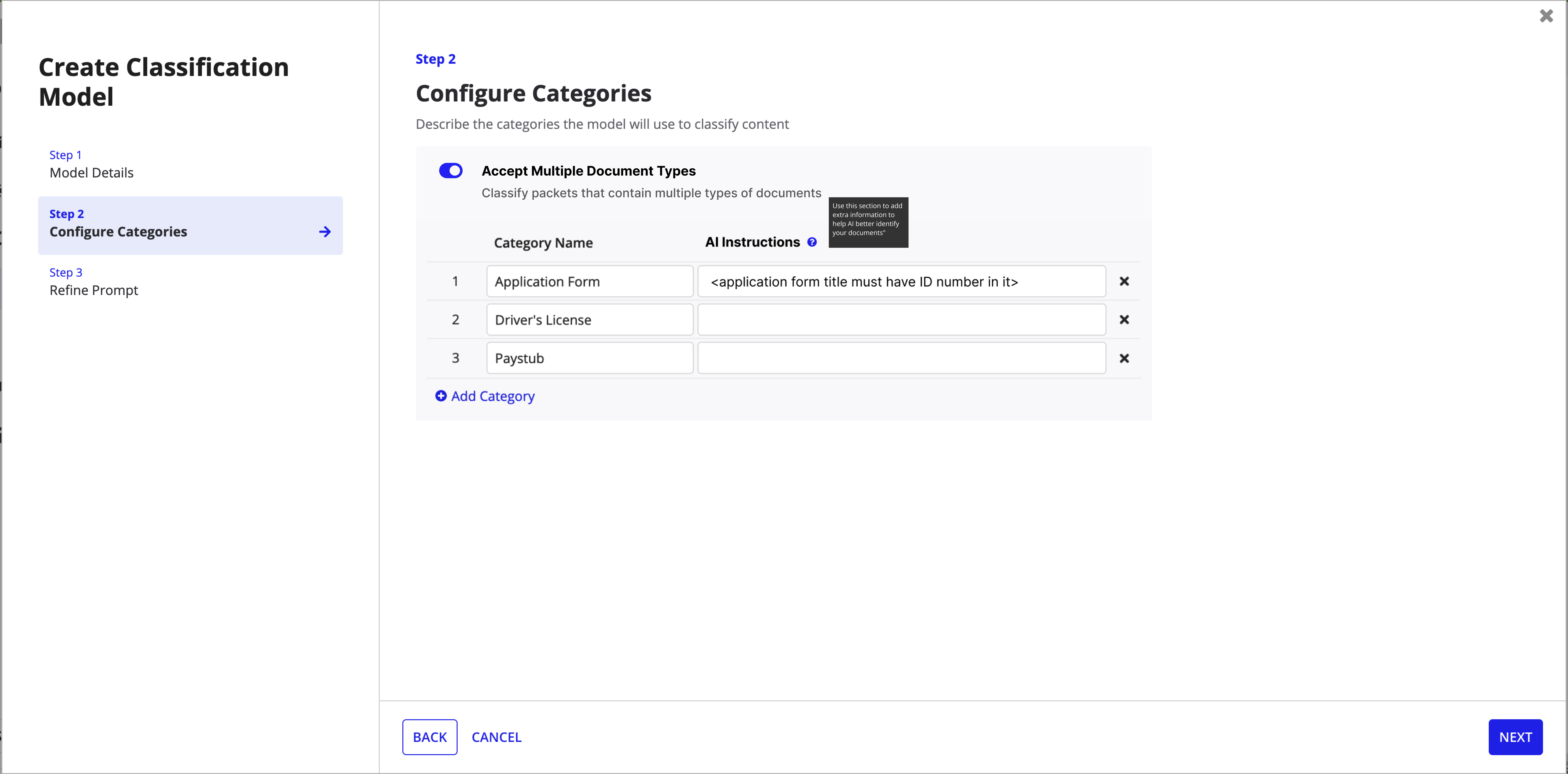
Step 2: Configure Categories -- the "Accept Multiple Document Types" toggle enables packet splitting.
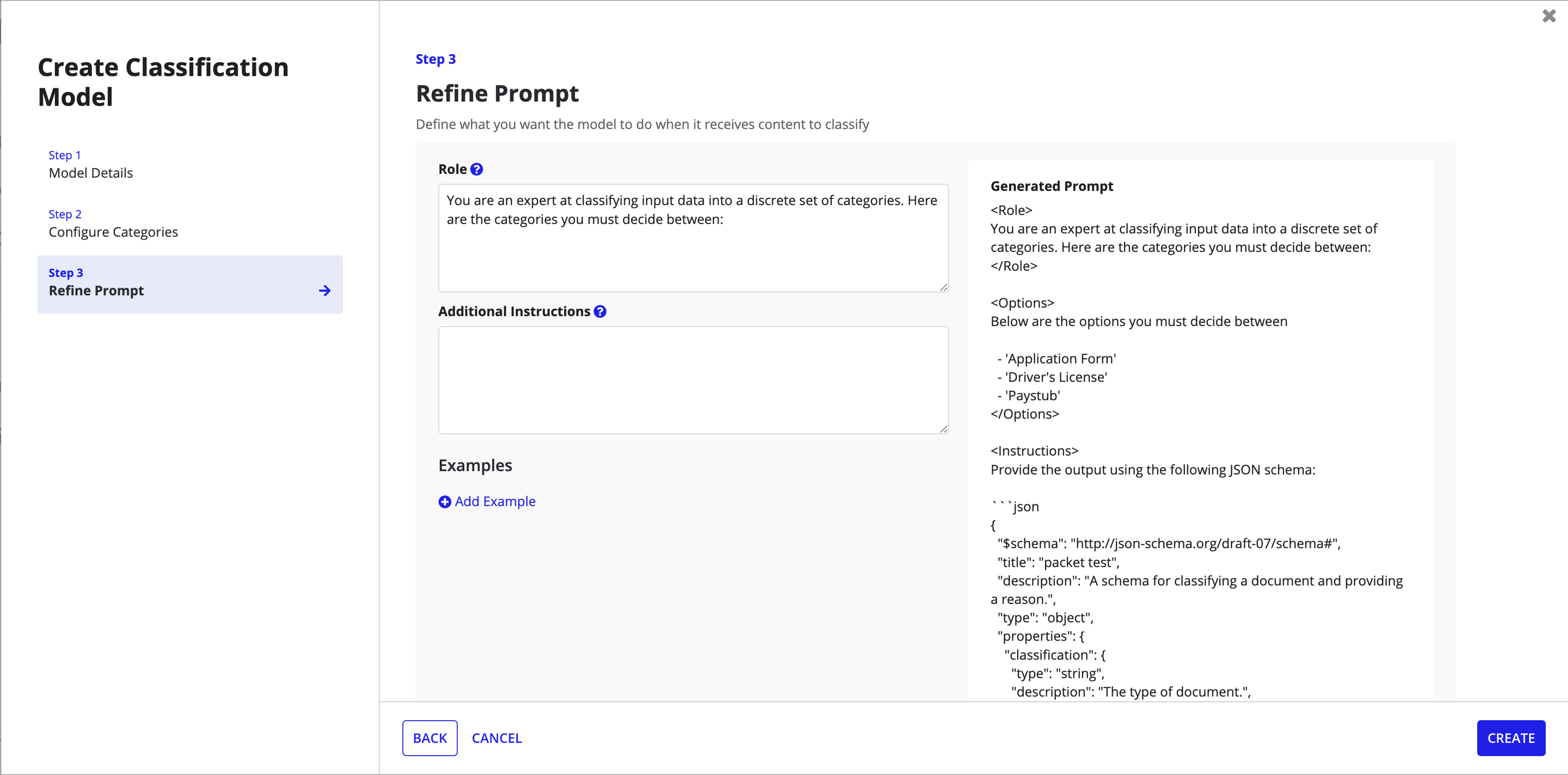
Step 3: Refine Prompt -- role definition, instructions, and generated prompt preview.
Reconciliation Flow
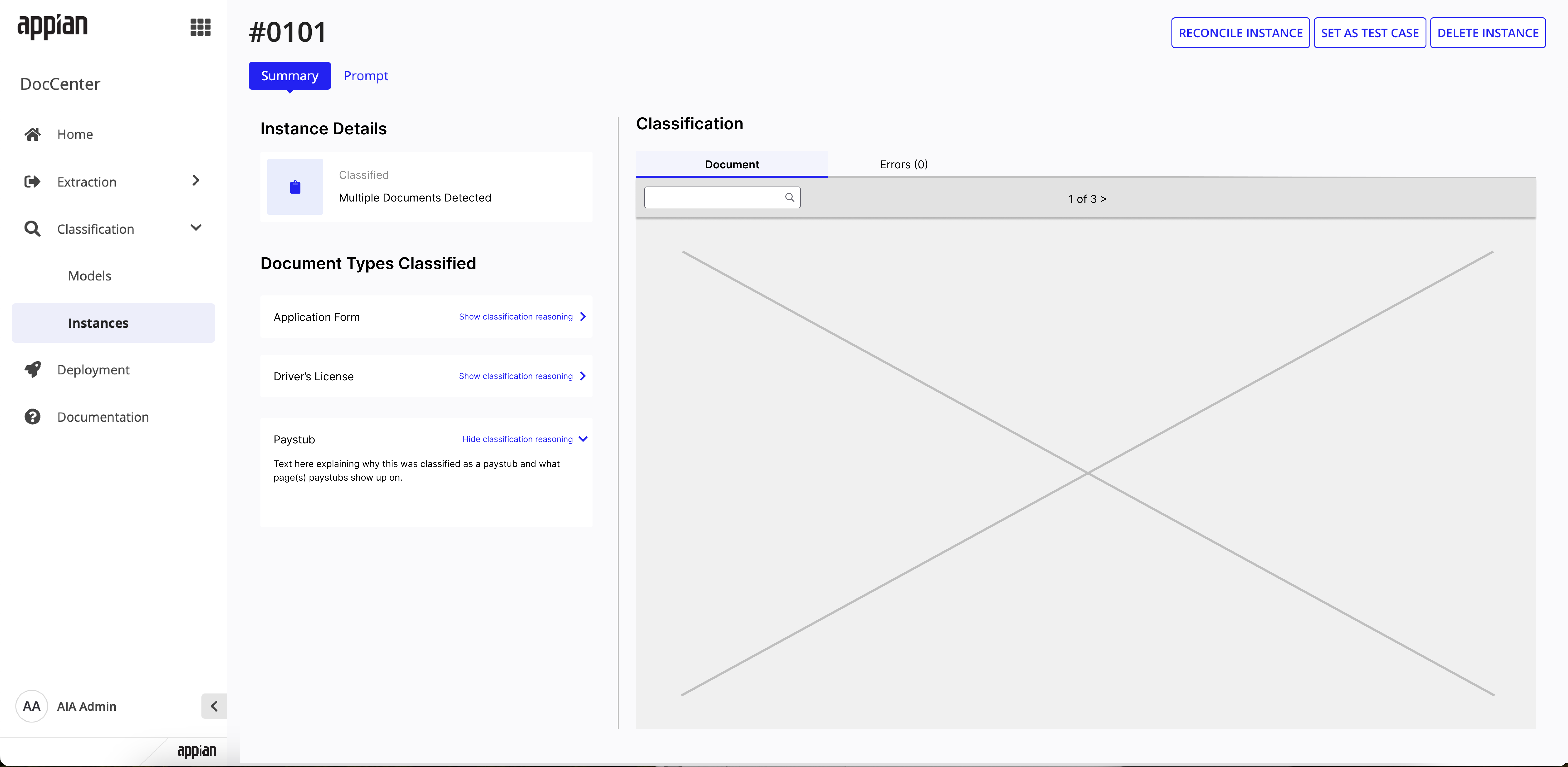
Instance summary -- shows "Multiple Documents Detected" with per-type classification reasoning.
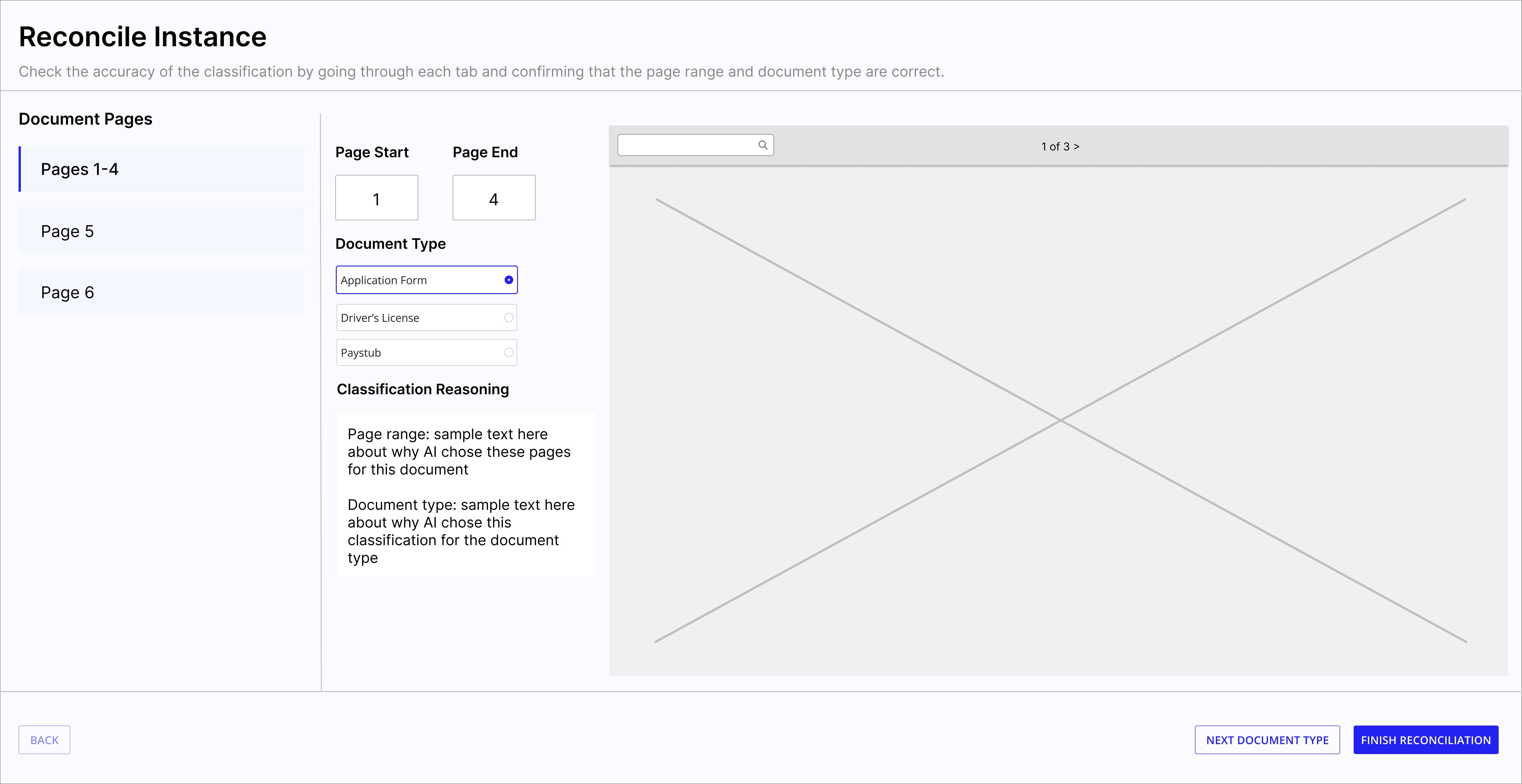
Reconcile view -- Pages 1-4 classified as Application Form with editable page ranges.
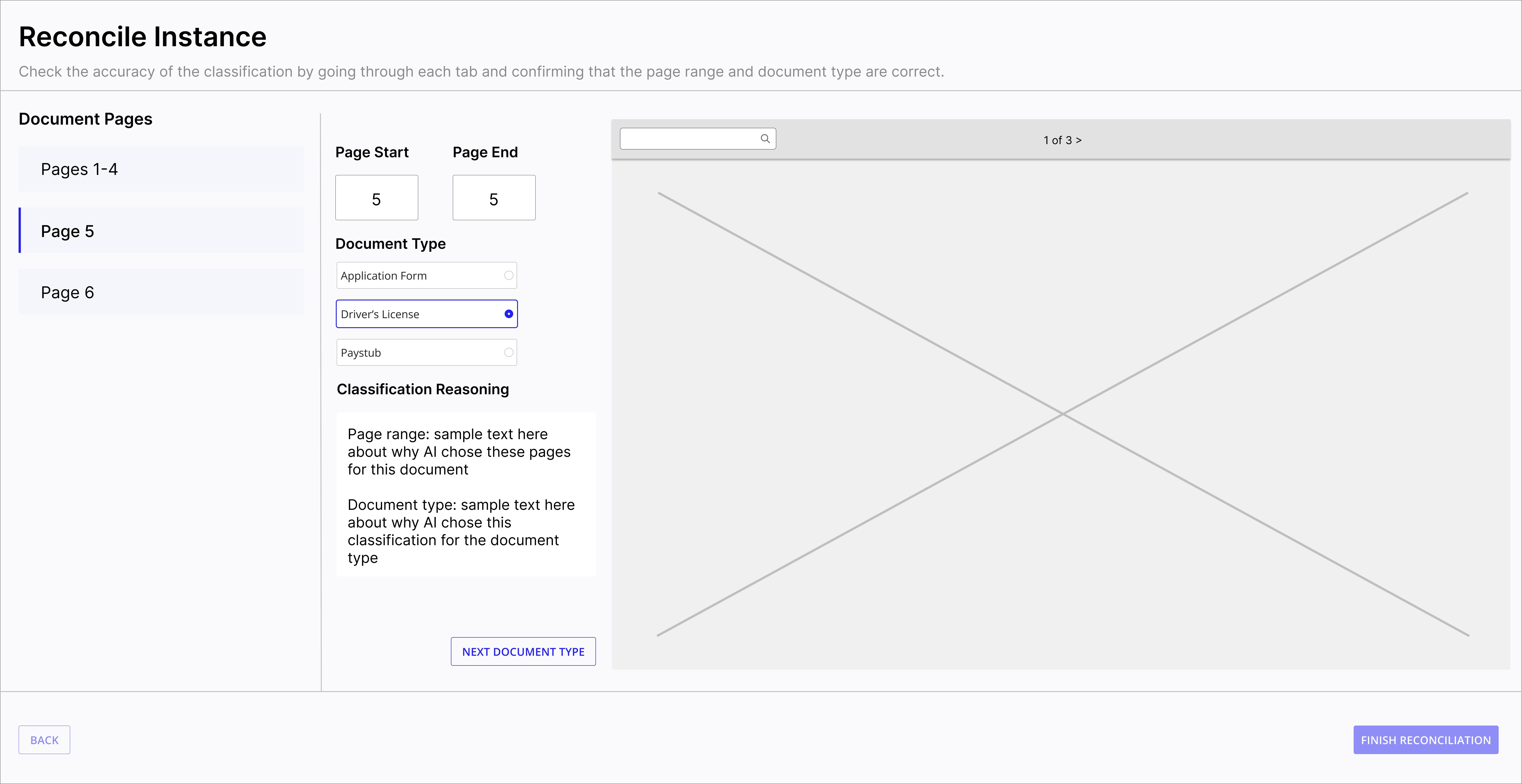
Reconcile view -- Page 5 classified as Driver's License, navigating between split documents.
Key Design Decisions
Opt-in at model creation
Packet splitting is a toggle, not a default. Not every classification model deals with bundled PDFs, so keeping it opt-in avoids adding complexity for people who don't need it.
Reuse the reconciliation pattern
Instead of building a whole new review flow, I extended the existing reconciliation interface to show split results. People already know how reconciliation works, so this just adds page range verification onto something familiar.
Seamless extraction handoff
Once packets are split and classified, individual documents get automatically routed for extraction. Users shouldn't have to re-upload anything or manually connect split outputs to extraction models, so the design handles that handoff for them.
Final Solution
The shipped feature spans model configuration, version management, instance tracking, and a fully redesigned reconciliation flow for multi-document packets.
Model Configuration
Packet splitting is enabled in Step 2 of model creation with a clear choice between single-document classification and multi-document splitting. The update modal exposes the same toggle for existing models.
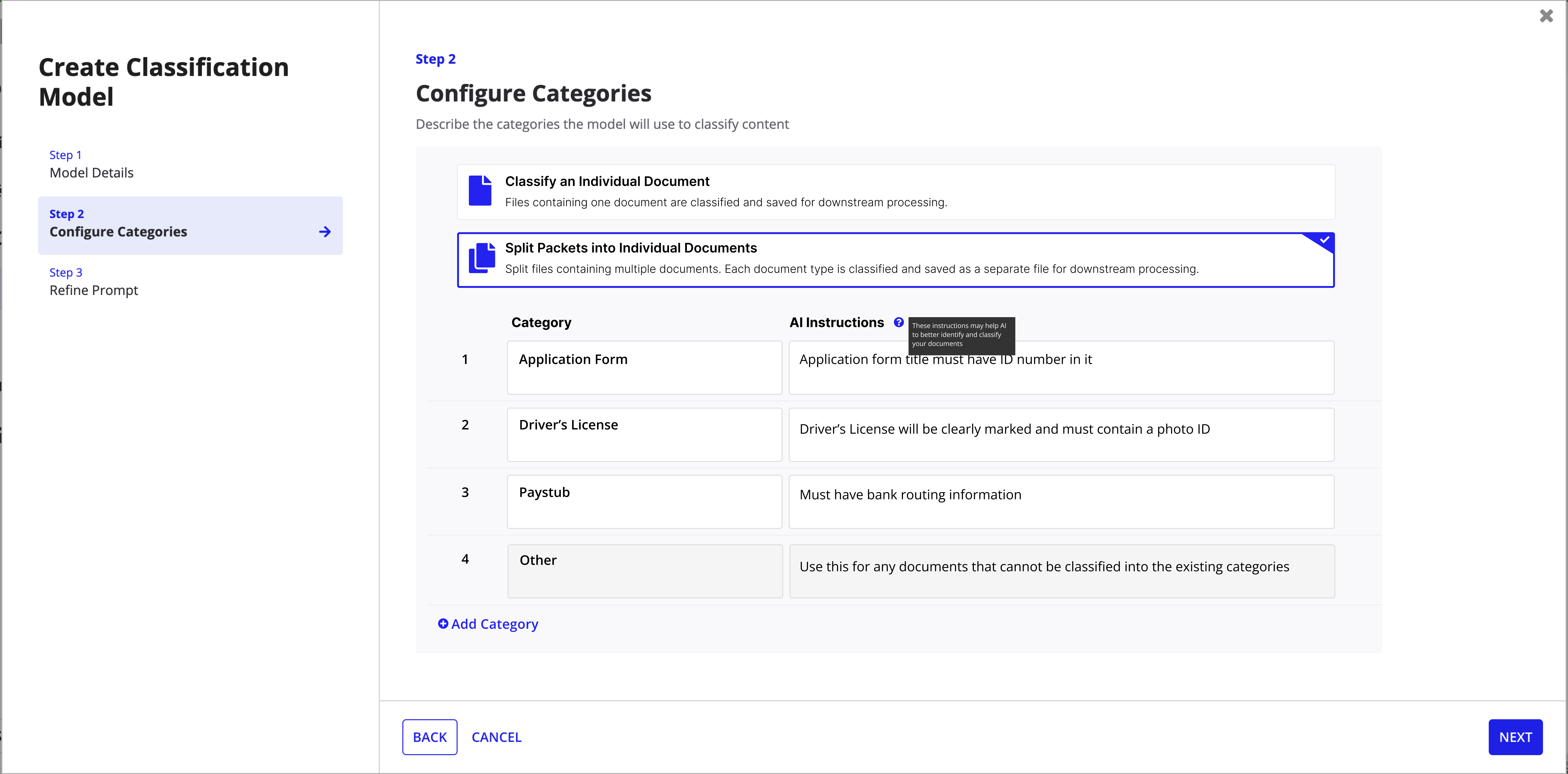
Create model -- Step 2 with explicit split vs. single-document choice and an "Other" catch-all category.
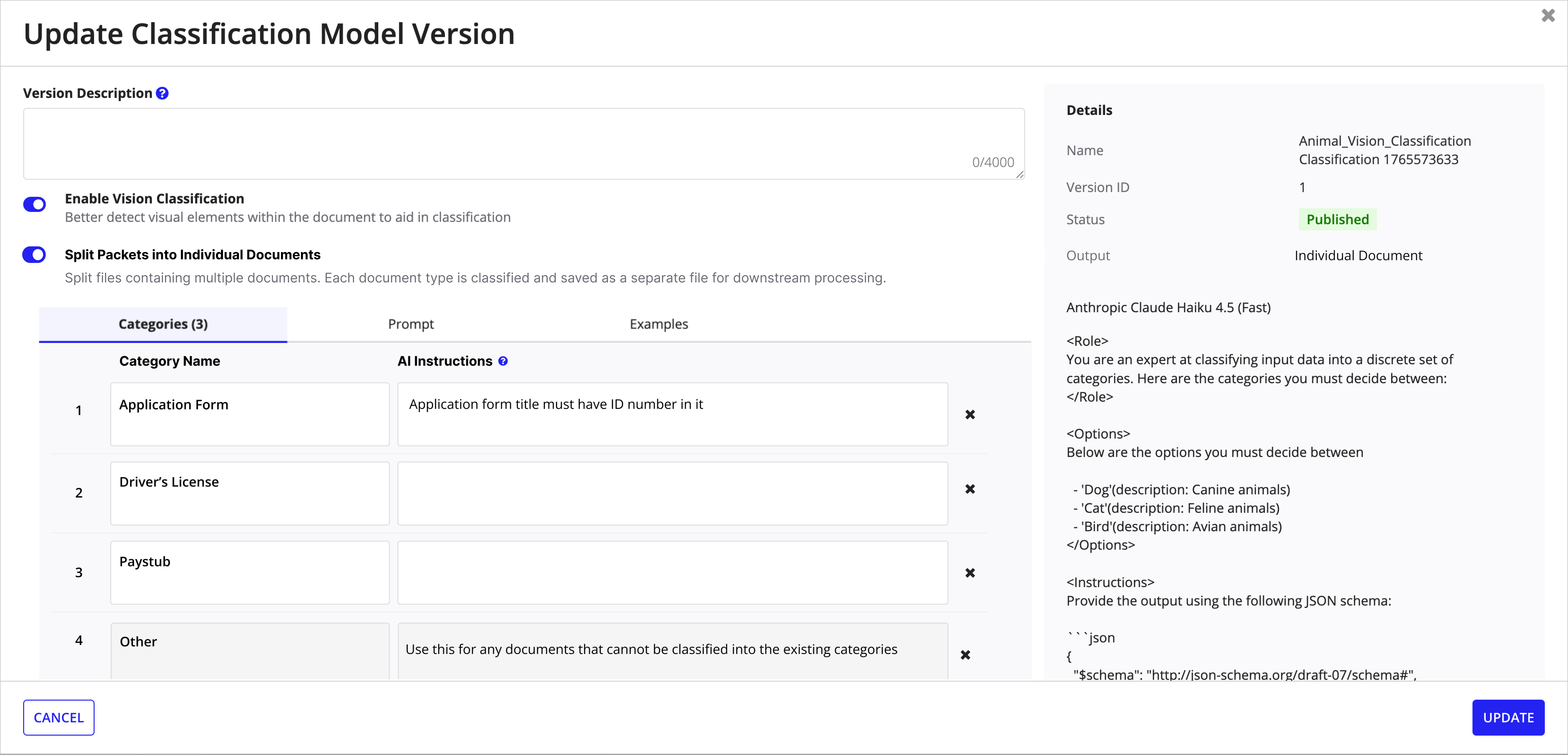
Update model version -- toggle splitting on/off with version details and prompt preview.
Model Management
Models list and version history surfaces make packet splitting visible at a glance with tags and the "Multiple Outputs" column.
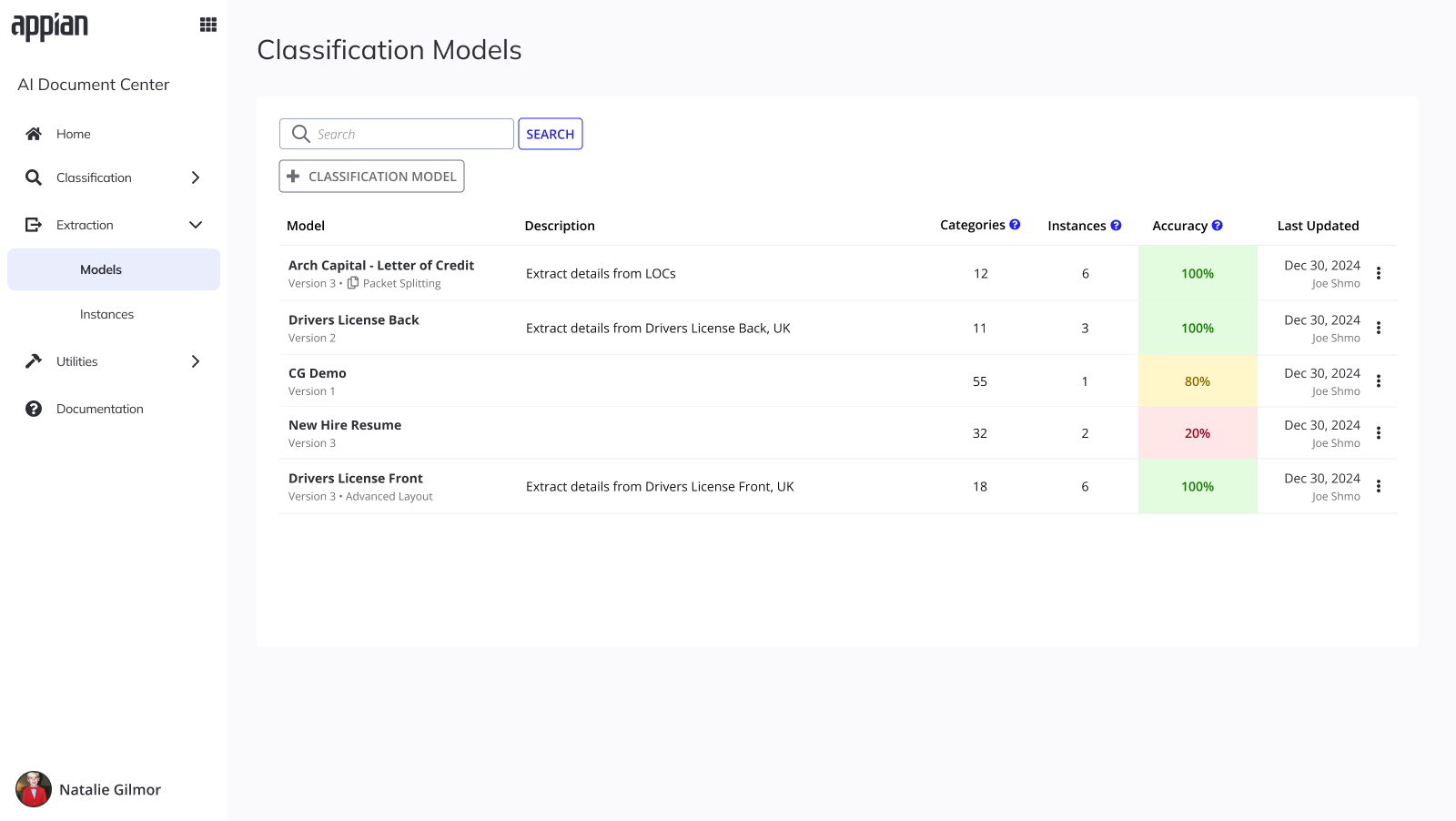
Models list -- Packet Splitting tag visible at a glance with color-coded accuracy.
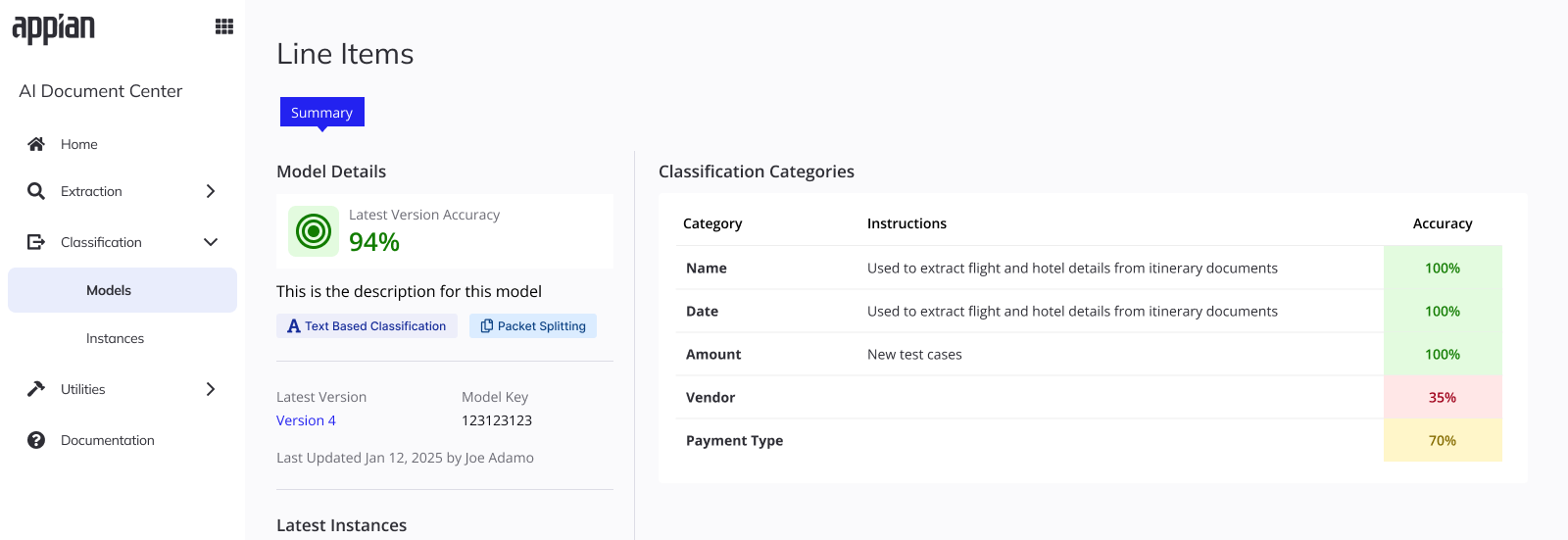
Model summary -- accuracy breakdown per category with Packet Splitting badge.
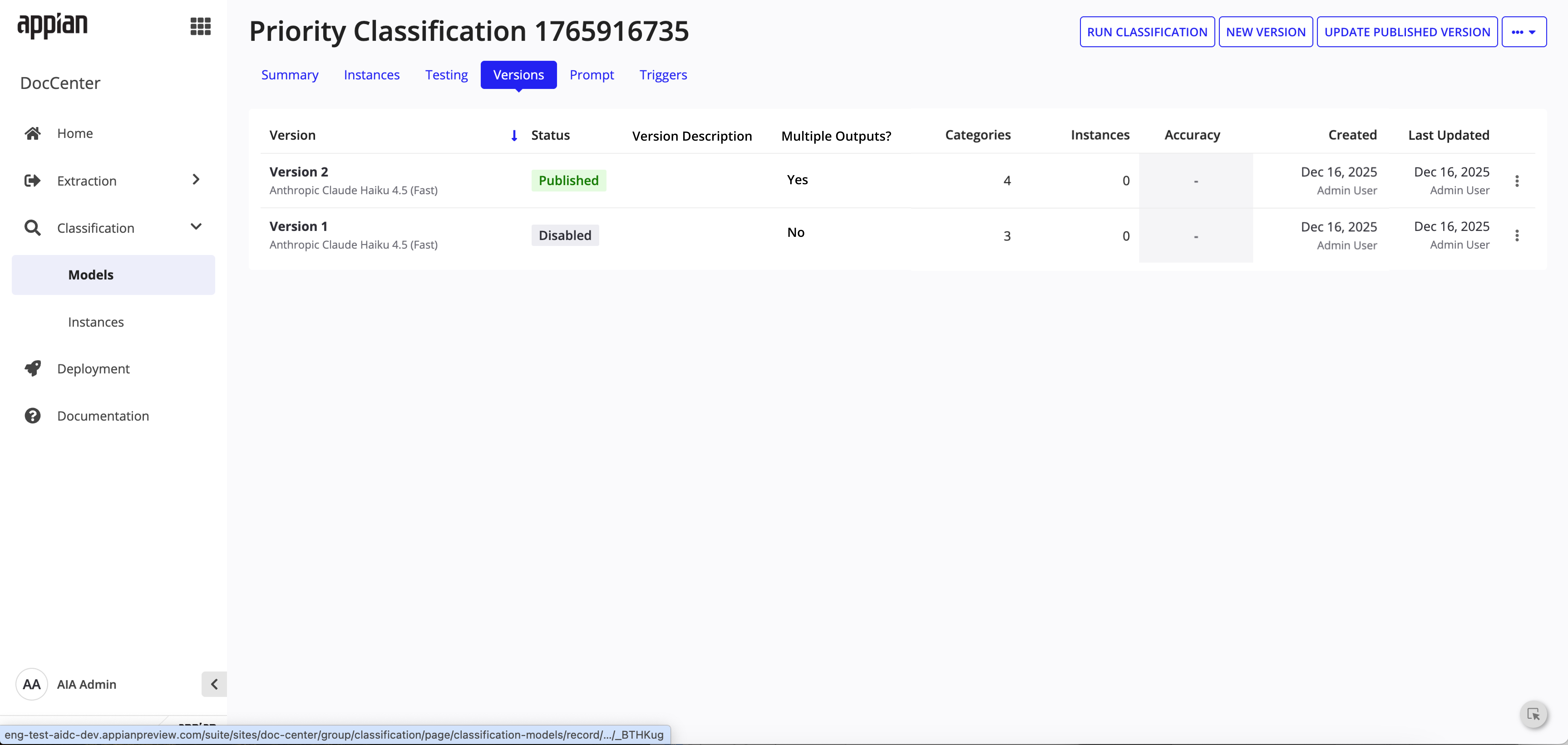
Versions tab -- "Multiple Outputs?" column tracks which versions have splitting enabled.
Instance Tracking
The instances list now shows multi-document classification values and reconciliation change summaries. Instance detail pages surface per-document status and reconciliation history.
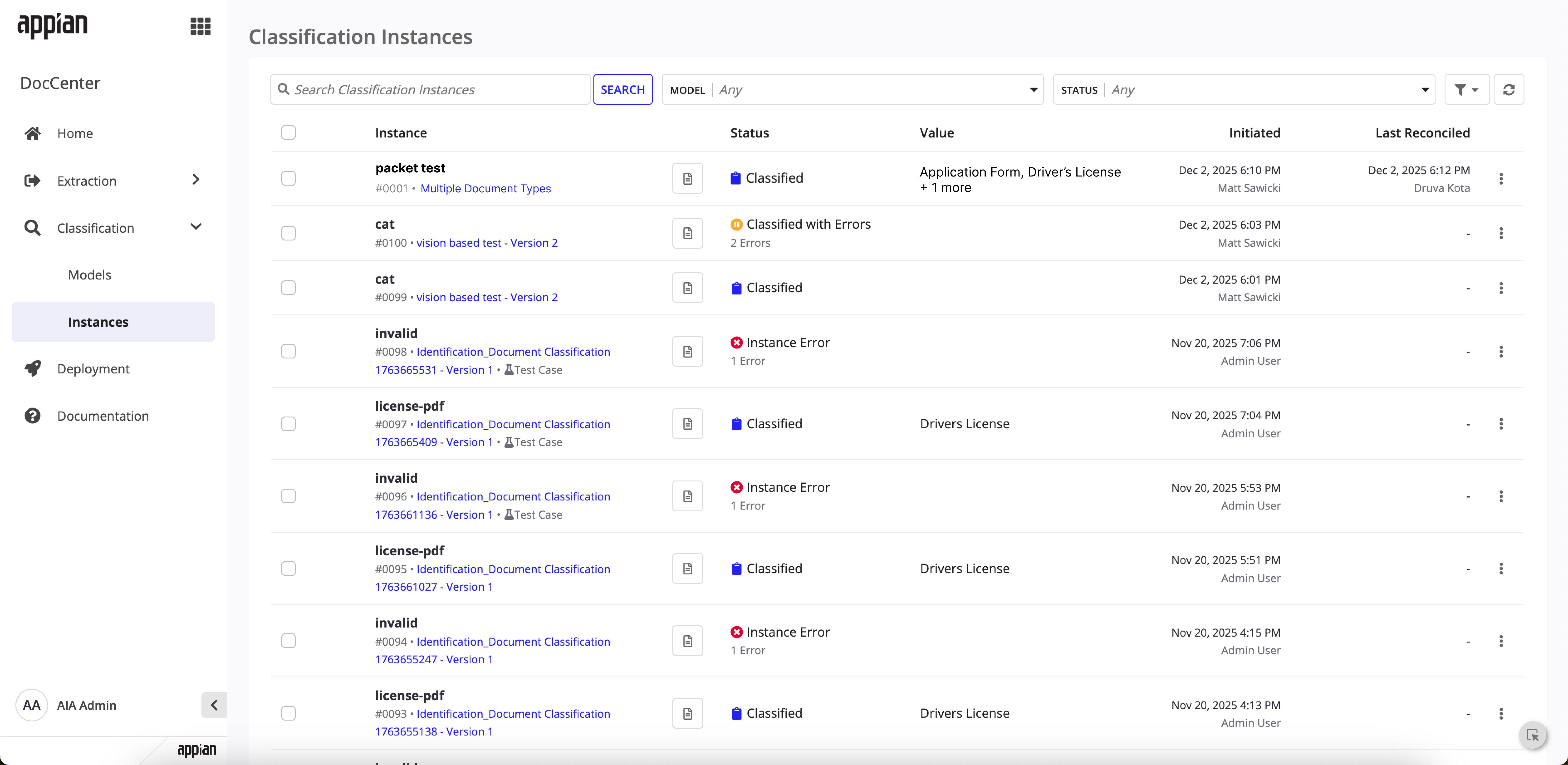
Instances list -- classified packet showing detected document types in the Value column.
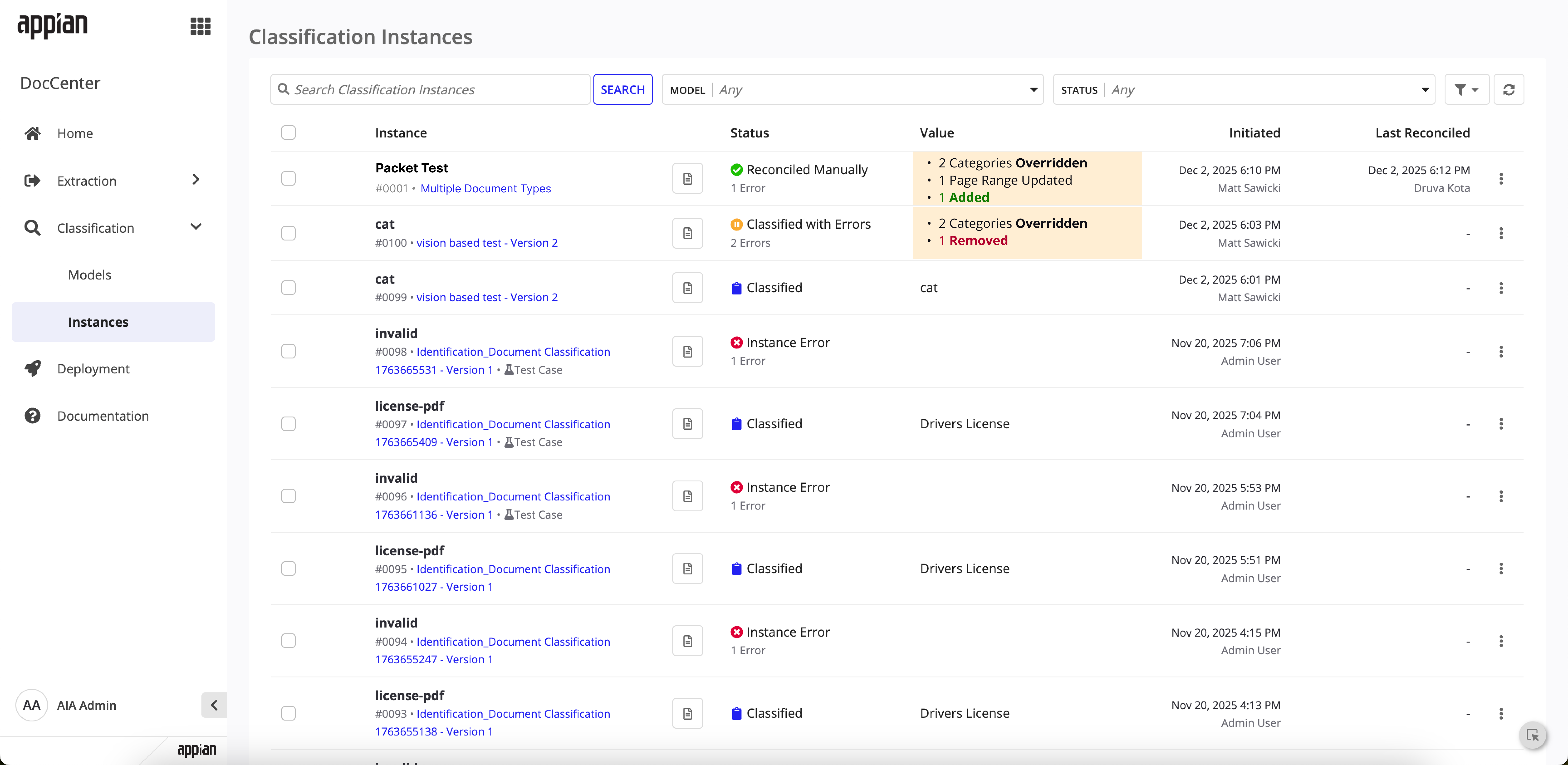
Instances list -- reconciled packet with change summary highlighting overrides and additions.
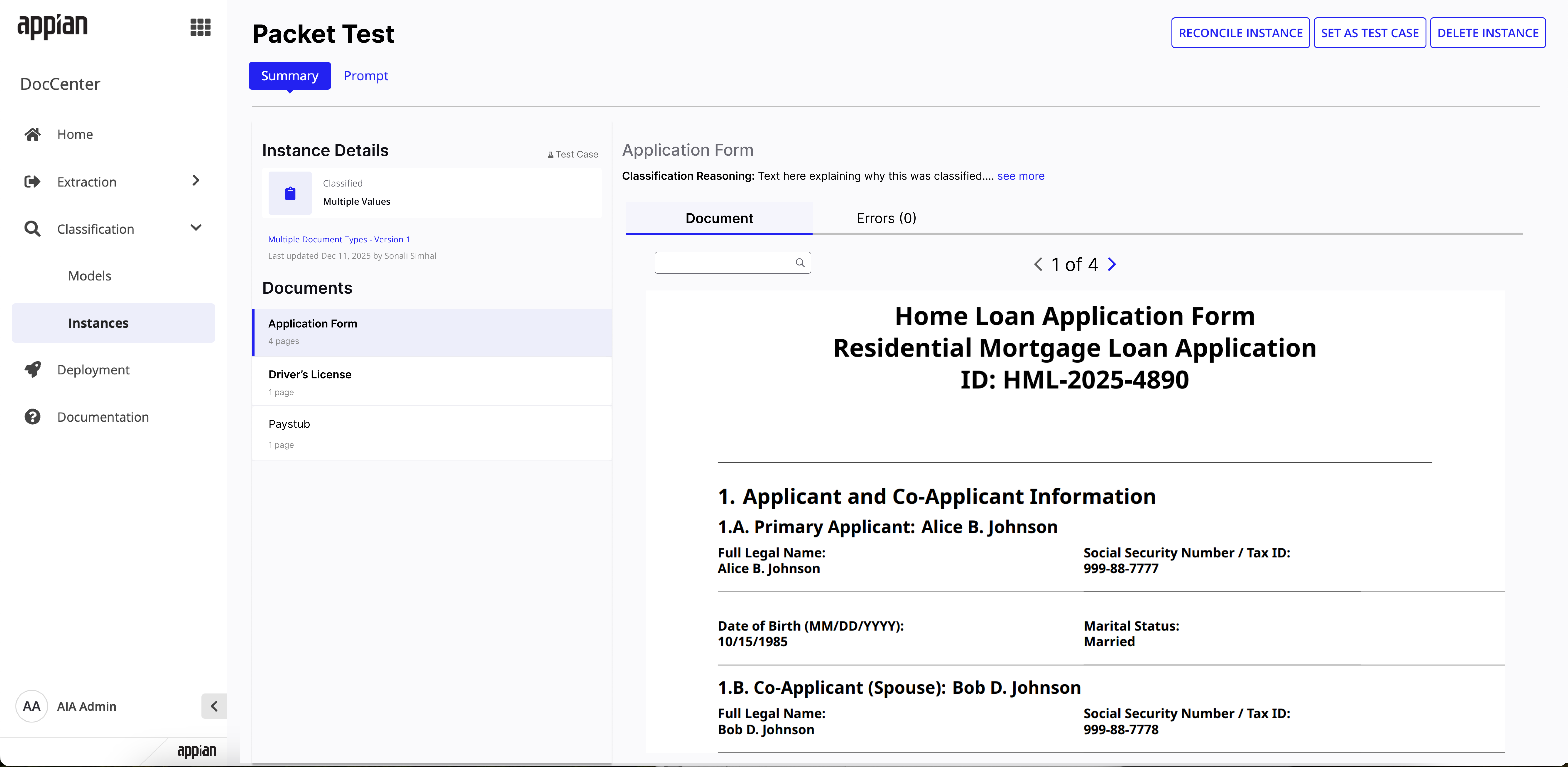
Instance detail -- classified state with per-document breakdown and page counts.
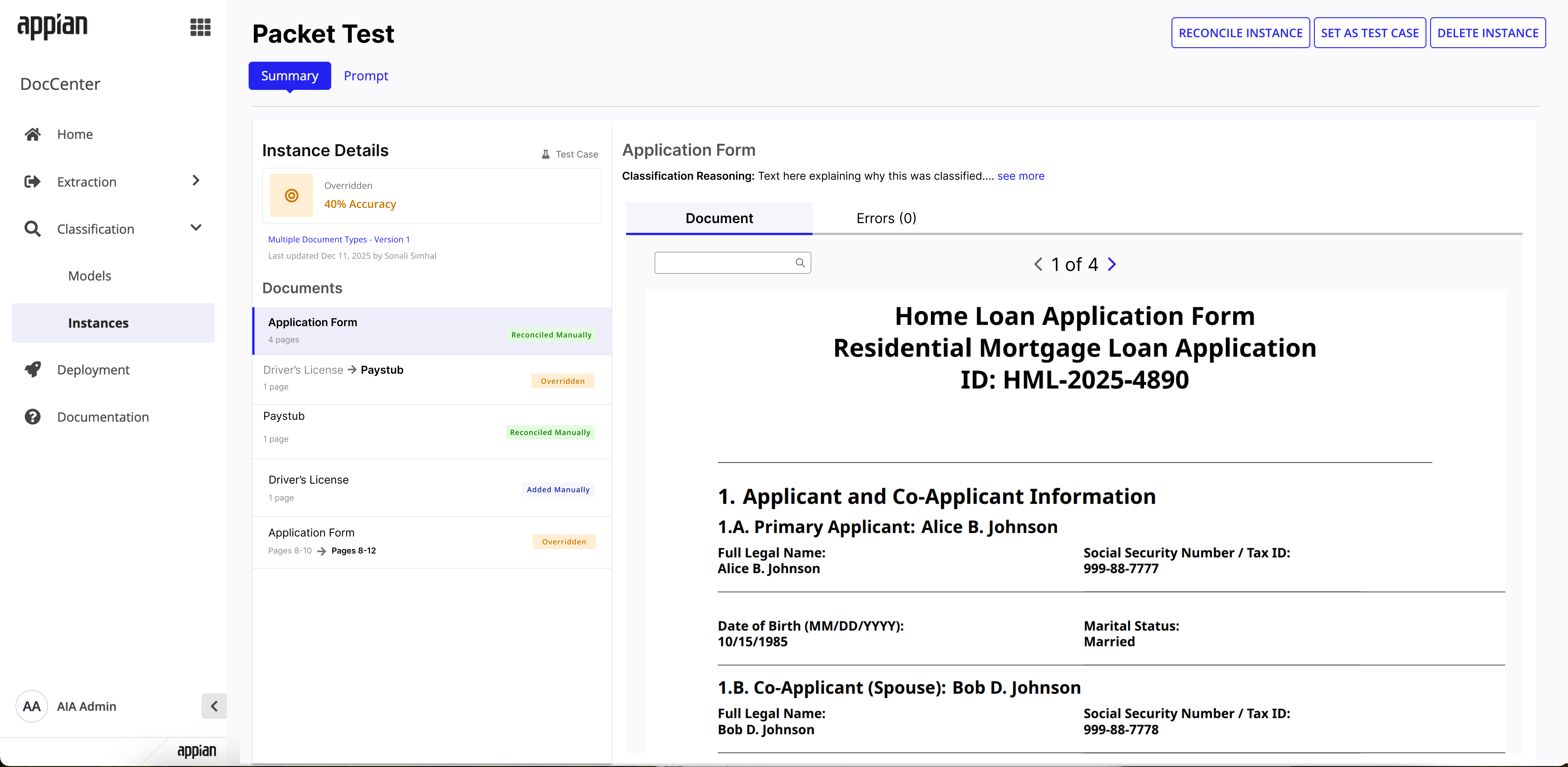
Instance detail -- post-reconciliation with per-document status badges showing what changed.
Reconciliation
The redesigned reconciliation flow lets users verify AI-detected split points, adjust page ranges, override categories, add new document splits, and catch missing pages -- all before data flows downstream.
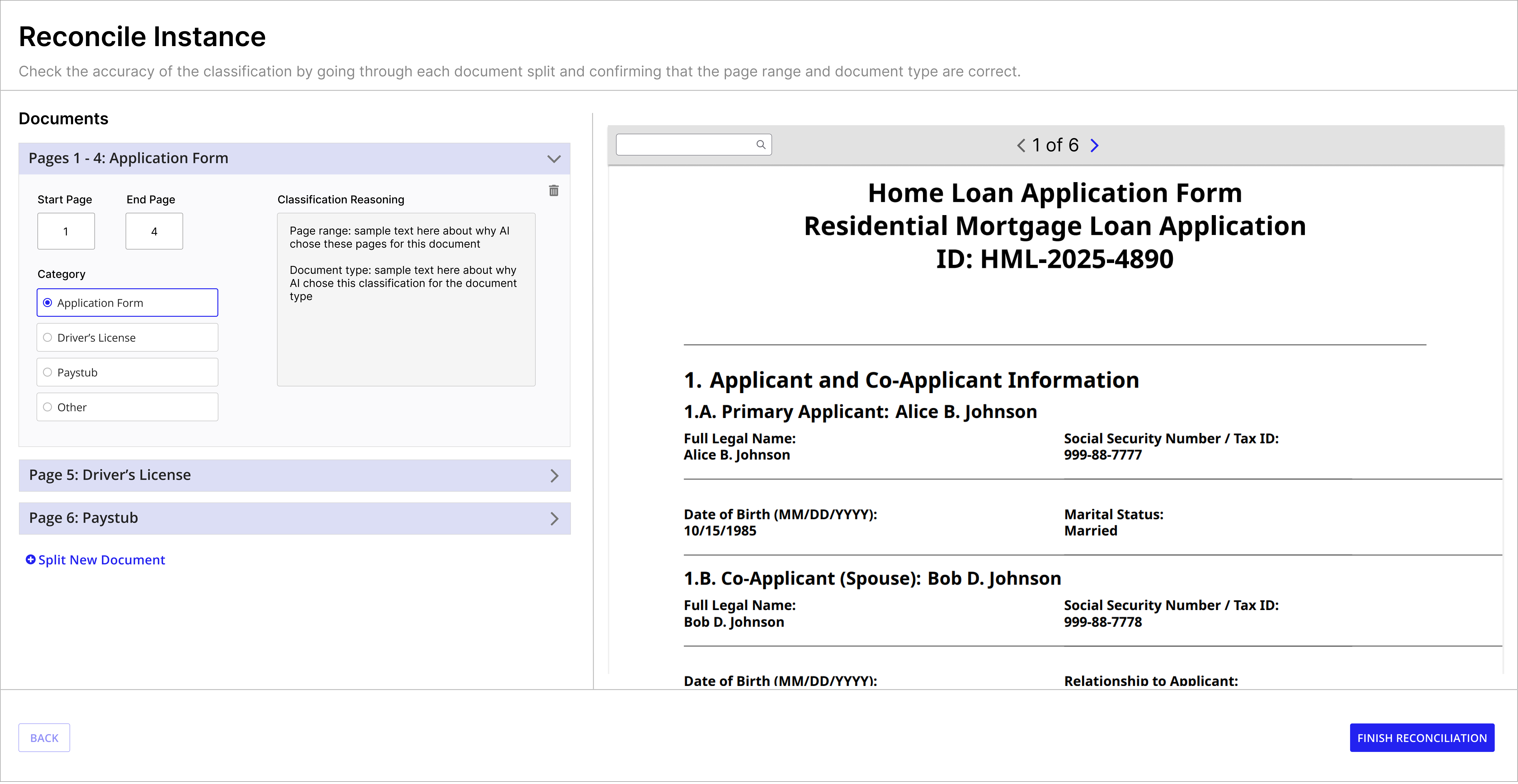
Reconcile view -- expanded split with editable page ranges, category selection, and classification reasoning.
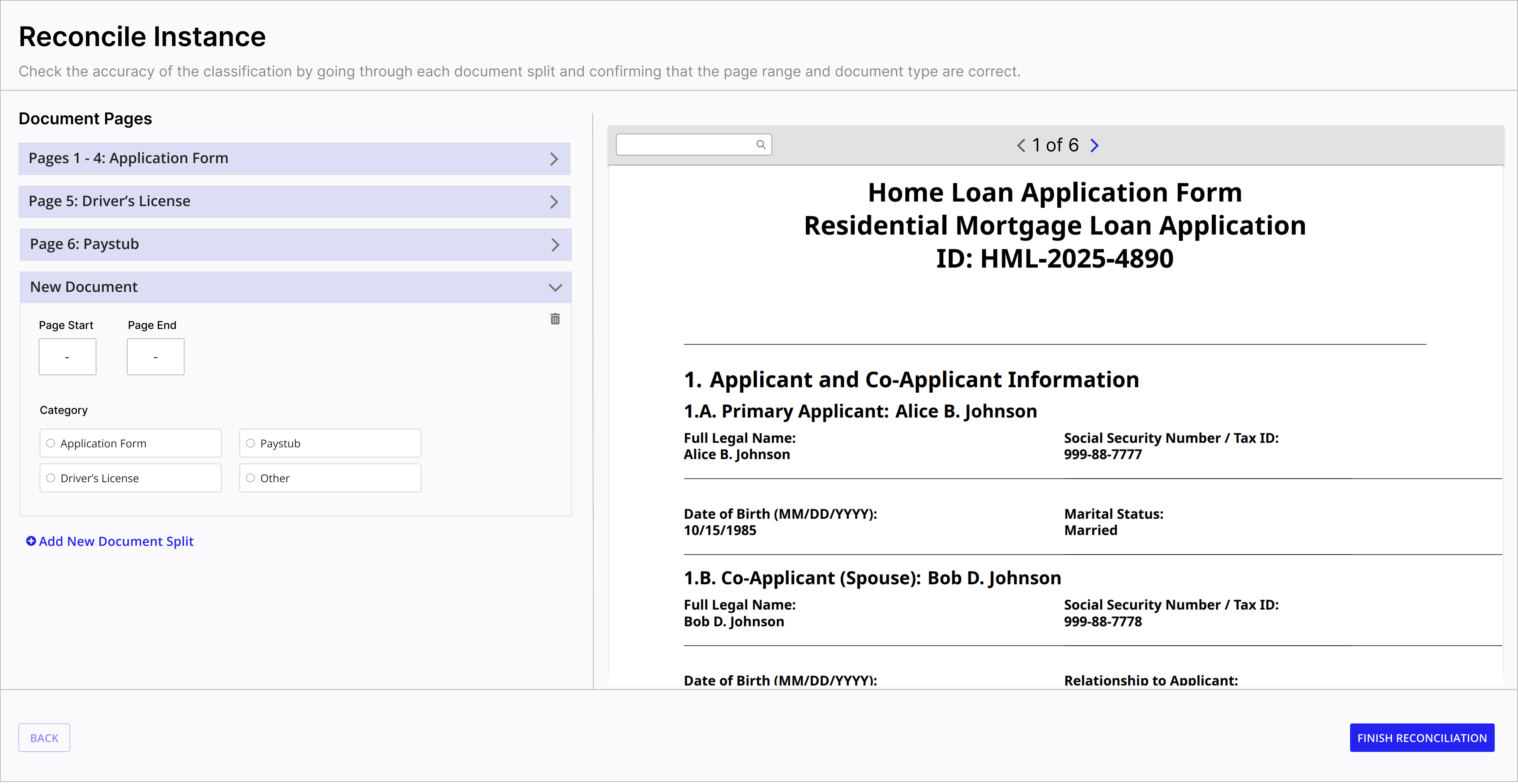
Add new split -- users can manually add documents the AI missed.
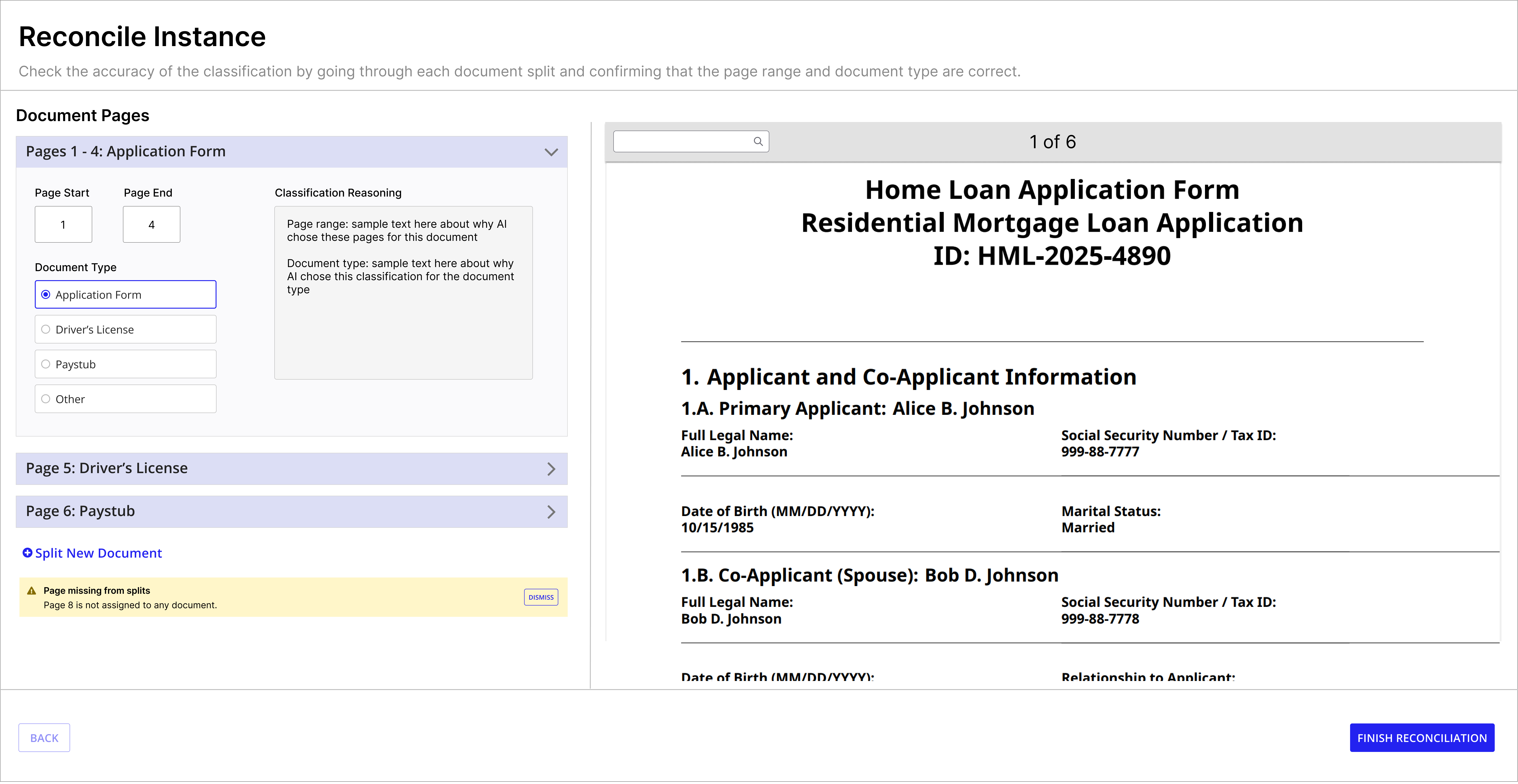
Missing page warning -- alerts users when pages aren't assigned to any document split.
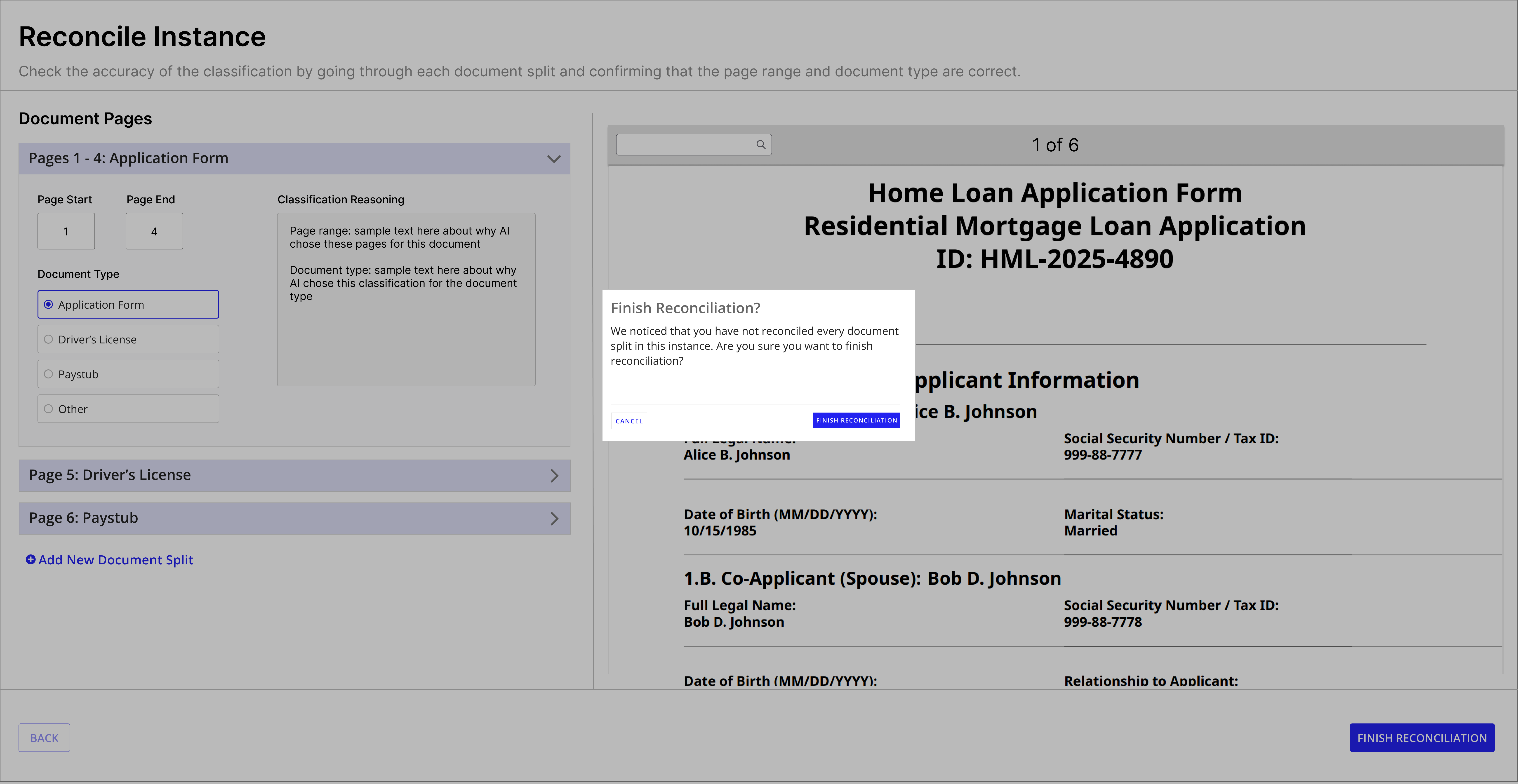
Finish confirmation -- warns when un-reconciled splits remain before completing.
My Influence & Tradeoffs
This feature meant pushing on user needs when engineering had different assumptions about how people would actually use it.
Championing the "AI Instructions" Field
User research turned up a real pain point: classification accuracy was suffering because users had no clear way to guide the AI's decisions. The existing "description" field was meant for documentation, but people kept trying to use it for classification hints, and the AI wasn't picking up on those correctly. Engineering initially didn't want to add a separate "AI Instructions"field, the argument being that users should just know to put instructions in the description. I pushed back and brought in user session recordings showing the actual confusion and misclassifications this caused. Having a dedicated field made the intent obvious: description is for people, AI Instructions is for the model. That change directly improved classification accuracy by giving users an actual mechanism for domain-specific context.
Simplifying the Split + Classify Experience
Engineering wanted to build two separate UI flows: one for "split first, then classify"and one for "classify and split together." I pushed back because user research showed that distinction meant nothing to actual users. They just wanted their packets processed, they weren't thinking about the technical order of operations. I argued for a single toggle that hid all of that complexity. It meant more backend work to support both paths cleanly, but it gave people a much simpler mental model.
Reflection
Early user research shaped the whole feature. Interviewing solutions architects before touching wireframes meant the design addressed real workarounds instead of hypothetical ones. The single-toggle model came directly out of that feedback.
Competitive research built conviction. Mapping out how Google, AWS, and others handled packet splitting made it clear that a low-code toggle approach was genuinely different. It also helped get engineering and product aligned on direction fast.
Going from low-fi to mid-fi caught edge cases early. Walking through the user flow before committing to UI surfaced questions like missing-page handling and the "Other" catch-all category, things that would've been expensive to fix later.
Designing for AI means designing for trust, and trust breaks down in a few specific, predictable places. When the model is uncertain, users need to see that, which is why per-category accuracy shows up on the model summary instead of just one overall score. When the model gets it wrong, users need an easy way to fix it without starting over, which is what the reconciliation flow is for, with Overridden and Added Manually treated as normal states, not errors. And when the model doesn't recognize something, it shouldn't force a bad guess, which is the whole reason the "Other" catch-all exists, so false confidence doesn't hide as a false positive. None of this makes the AI more accurate. It makes its uncertainty visible and its mistakes cheap to correct.
Simplicity is the real differentiator in enterprise tools. Competitors offer powerful splitting capabilities buried behind developer setup. Making the same capability accessible through one configuration toggle ended up being the strongest competitive advantage.
Context
Classification is usually just one step in a bigger process. Once a model classifies a batch of documents, teams often need to kick off something else, like extracting data from invoices or routing purchase orders to the right department.
Before triggers existed, users had to manually start those downstream processes themselves, or build custom integrations outside DocCenter just to connect the dots. I wanted to give people a simple way to say, when this classification activity finishes, automatically start this process. No code, no workarounds.
How It Works
Users can create triggers from the Triggers tab within any classification model. I kept the setup intentionally minimal, just three decisions:
Timing
Choose whether the triggered process runs synchronously (waits for it to finish) or asynchronously (kicks it off and moves on).
Process Model
Select the process model to start when the activity completes. This is where users connect classification to their existing workflows.
Activity Type
Choose which classification activity should trigger the process. Currently supports Reconciliation, with more types planned.
The Feature in Action
Empty state with clear call to action
Simple trigger creation with guardrails
Configured trigger with inline management
Key Design Decisions
One trigger per model
I kept the interaction model simple: one trigger per classification model. If users need to trigger multiple processes, they can create a wrapper process model instead. This avoids complicated ordering logic in the UI and keeps the mental model straightforward.
Guardrails for reliability
Triggered processes need to meet certain requirements, like having the right permissions and a parameterized instance variable. I made sure these requirements were clearly surfaced in the UI so people don't hit confusing errors later at runtime.
Edit and delete in context
Users can update or remove triggers right from the Triggers tab without navigating away. Small detail, but it keeps the workflow tight and cuts down on accidental misconfiguration.
My Influence & Tradeoffs
Prioritizing This Over Other Roadmap Items
Triggers wasn't the flashiest thing on the roadmap. Bulk operations and advanced analytics dashboards had more internal champions pushing for them. But I made the case that Triggers solved a core user need: connecting document intelligence to actual business processes. Without it, DocCenter was a standalone tool. With it, it became part of the workflow. I brought this framing to leadership and got alignment to prioritize Triggers over the more visible, less impactful features.
Impact
Since going generally available, DocCenter has seen strong and steady adoption across enterprise customers and government agencies. Here's a snapshot of where things stand:
123
Active customers in production
~20K
Instances run per month
75K+
Documents processed in 2025
1,008
Cumulative installs by Dec 2025
208
Models created (72% extraction, 28% classification)
60K
Documents processed
Customer Highlights
45 days to 1 day
Reduced audit backlog from 45 days to 1 day for a large mortgage company
75% faster review time
Faster review time on Attending Physician Statements for a large insurance company in North America
95% automation
Of order management automated at a healthcare company
36% reduced time to invoice
Faster invoicing turnaround through automated document processing
Want to learn more?
Happy to walk you through how I approached this product and the thinking behind the decisions.
Get in Touch